
Let’s delve into the world of SEO by reflecting on your recent efforts in the digital space. If you have been improving your website, you have likely been working on several tasks. These tasks include finding good keywords, writing attractive meta descriptions, and obtaining important backlinks.
These strategies have been the go-to arsenal for many marketers aiming to boost their site’s visibility in organic search results. However, here’s the thing: while these tactics are undeniably effective, they represent just the tip of the SEO iceberg.
There’s a whole lot of techniques embedded in SEO, and these are the ones that power your website’s organic growth engine from behind the scenes. We’re referring to the nitty-gritty of Technical SEO, where factors like site architecture, mobile optimization, and page speed are important.
While these aspects of SEO may not seem important, they serve as the crucial factors that can either elevate or hinder your online visibility. To embark on the path of mastering Technical SEO, your initial move entails assessing your current standing.
This begins with conducting a comprehensive site audit. Once you’ve pinpointed areas in need of improvement, the subsequent step entails formulating a strategic plan to rectify these deficiencies.
In this article, we will delve deeply into these procedures, equipping you with the knowledge and tools essential to amplify your website’s proficiency in Technical SEO.
What is Technical SEO?
Technical SEO refers to a set of strategies and actions designed to optimize your website’s structure and elements, making it more accessible to search engines for efficient crawling and indexing.
It’s essential to recognize that Technical SEO, along with content strategy and link-building, synergistically contribute to improving the ranking of your web pages in search engine results.
Differences in Technical SEO, On-Page SEO, and Off-Page SEO
Here are the straightforward distinctions between On-Page SEO, Off-Page SEO, and Technical SEO:
On-Page SEO
This is about the content on your webpage that communicates to search engines and readers what your page is all about. It involves elements like image alt text, keyword usage, meta descriptions, H1 tags, URL naming, and internal linking. You have the most control over on-page SEO because it’s all within your website.
Off-Page SEO
Off-page SEO focuses on proving to search engines how reputable and valuable your page is by earning votes of confidence from other websites, primarily through backlinks or links from other sites to yours.
The quantity and quality of these backlinks contribute to a page’s ranking. In essence, it’s like getting recommendations from credible sources on the web.
Learn more about off-page SEO in our step-by-step guide
Technical SEO
This is still under your control, but it’s a bit more complex to master because it involves behind-the-scenes elements. Technical SEO ensures that your website is technically sound, making it easier for search engines to crawl and index.
It deals with factors like:
- Site speed
- Mobile-friendliness
- Structured data.
The importance of Technical SEO
The significance of Technical SEO cannot be overstated. While it might be tempting to overlook this aspect of SEO, it plays a pivotal role in determining your organic traffic. Even if your content is impeccably crafted, informative, and valuable, it’s essentially hidden from the world unless search engines can effectively crawl and index it.
In essence, without Technical SEO, your content remains incomprehensible to search engines, making it virtually invisible to potential readers and users. It’s the backbone that ensures your content is discoverable and accessible to your target audience in the vast digital space.
The Fundamentals of Technical SEO
Technical SEO is a complex topic, and it’s often more manageable when broken down into smaller, actionable components. If you prefer tackling substantial tasks systematically, you’re in good company.
Surprisingly, everything we’ve discussed so far can be categorized into one of five key areas, each with its checklist of actionable tasks. These five categories represent the hierarchy of technical SEO:
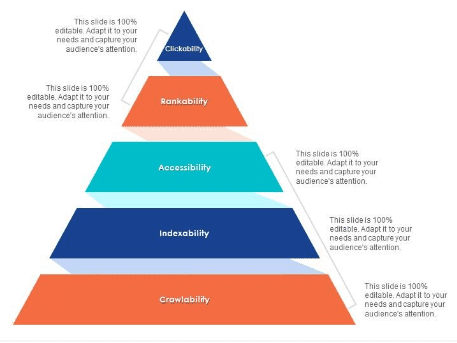
Foundations of a Technical SEO Audit
Before diving into your technical SEO audit, it’s essential to establish some fundamental factors. These technical SEO basics should be addressed as prerequisites before proceeding with the broader website audit (Website Grader).
Optimize Your Chosen Website URL Configuration
Your website’s domain, such as mylegalsoftware.com, plays a critical role in how easily people can discover your site through search engines and provides a consistent means of identifying your web presence.
When you designate a preferred domain, you are informing search engines about your preference for either the www or non-www version of your site to appear in search results. For instance, you might opt for www.mywebsite.com instead of mywebsite.com.
This instruction directs search engines to prioritize the www variant of your site and automatically redirects all users to that specific URL. If not set, search engines might treat these two versions as separate entities, leading to fragmented SEO benefits.
In the past, Google required you to specify your preferred URL version, but now, Google announced it is no longer supporting the preferred domain setting in Google Search Console. However, if you decide to specify your preferred domain version, you can do so using canonical tags, a topic we’ll cover shortly.
Regardless of your method, once you’ve established your preferred domain, it’s crucial to ensure that all variations, including www, non-www, http, and index.html, all seamlessly redirect to that chosen version.
Enforce SSL Encryption
SSL, or Secure Sockets Layer, is a crucial security feature that establishes a protective barrier between your web server (the software handling online requests) and a user’s browser. This layer of protection significantly enhances the security of your website. When users transmit sensitive information like payment or contact details to your site, SSL encryption greatly reduces the risk of this data being intercepted or hacked.
You can identify a website with SSL protection by looking for a domain that starts with “https://” instead of “http://,” accompanied by a lock symbol in the URL bar.

Search engines give preference to secure websites. Starting in 2014, Google indicated that HTTPS encryption was a positive ranking factor for search engine results. Therefore, it’s crucial to set the SSL version of your homepage as your preferred domain.
Once SSL is set up, you must migrate any non-SSL pages from “http” to “https.” While this may seem like a significant undertaking, the effort is well worth it for the benefits it brings to your website’s ranking. Here are the steps you should follow:
- Redirect all “http://mywebsite.com” pages to “https://mywebsite.com.
- Update all canonical and Hreflang tags to reflect the new “https” URLs.
- Update the URLs in your sitemap (located at “yourwebsite.com/sitemap.xml”) and your robots.txt (located at “yourwebsite.com/robots.txt”).
- Set up a new instance of Google Search Console and Bing Webmaster Tools for your “https” website, and closely monitor them to ensure that 100% of your traffic successfully migrates to the secure version.
Enhance Website Loading Speed
Website visitors have a limited tolerance for slow-loading pages, with most users expecting a webpage to load within six seconds or less. Google/SOASTA Research in 2017, shows that the probability of bounce increases 32% as page load time goes from 1 second to 3 seconds. Therefore, optimizing your site’s loading speed is a critical priority.
Fast page loading isn’t just beneficial for user experience and conversion rates; it also plays a role in your website’s search engine ranking.
Here are actionable strategies to boost your average page loading time:
- File Compression: Compress all your files, including images, CSS, HTML, and JavaScript files. Compression reduces their size, allowing them to occupy less space and load more swiftly.
- Redirect Auditing: Regularly review and optimize redirects. Each 301 redirect consumes valuable seconds in processing. Accumulated redirects, especially across multiple pages or layers, can significantly slow down your site.
- Code Optimization: Streamline your website’s code. Clean and efficient code is essential for faster page loading. Eliminate unnecessary elements and minify and compress your code to enhance performance.
- Content Distribution Network (CDN): Consider implementing a CDN. CDNs store copies of your website on servers in various geographic locations. This allows your site to load faster for users based on their location, as data has a shorter distance to travel between servers.
- Plugin Management: Outdated plugins can introduce security vulnerabilities that may harm your site’s rankings. Keep all plugins up to date and use only the most essential ones. Additionally, consider custom-made themes, as pre-made themes often contain excessive code.
- Cache Plugins: These plugins store a static version of your site to serve to returning visitors. This significantly reduces loading times during repeat visits.
- Asynchronous (Async) Loading: Opt for asynchronous loading of scripts. Normally, scripts are placed in the <head> of a webpage, prioritizing them over other page content. Using async code allows the server to process HTML and scripts simultaneously, reducing delays and accelerating page loading times. This is especially crucial for ensuring that visitors can quickly access the main content of your site.
Crawlability Optimization
Crawlability is the Cornerstone of Your Technical SEO Approach. Search engine bots are responsible for exploring and gathering data from your website’s pages. When these bots encounter obstacles that prevent them from crawling your site, it hinders their ability to index and rank your web pages.
Therefore, the initial phase of technical SEO implementation revolves around guaranteeing unimpeded access to your significant pages and ensuring a user-friendly navigation experience.
In the following sections, we’ll outline some crucial items to include in your checklist and key website elements to scrutinize. These steps will ensure that your web pages are in optimal condition for seamless crawling by search engine bots.
- Generate an XML Sitemap
An XML sitemap is a file that provides search engines with a structured map of your website’s content. It lists all the essential pages and their hierarchy. Search engines use this sitemap to efficiently crawl and index your site.
You create an XML file that includes URLs, their priority, and update frequency. Search engines read this file to discover and index your pages more effectively.
- Optimize your Crawl Budget Allocation
Crawl budget refers to the number of pages on your website that search engines can crawl in a given time frame. Maximizing your crawl budget ensures that search engines focus on your most important pages.
By improving site speed, reducing duplicate content, and fixing crawl errors, you can ensure that search engines spend their allocated crawl budget on your most valuable content.
- Enhance your Website’s Structural Organization
Site architecture refers to the way your website’s pages are organized and connected. A well-structured site makes it easier for search engines to understand your content and its relevance.
You create a logical hierarchy of categories and subcategories, making navigation intuitive for both users and search engines. This structure helps distribute link authority effectively.
- Establish a Structured URL Format
A clean and logical URL structure enhances both user experience and search engine understanding. It’s crucial for SEO to have URLs that convey content hierarchy.
You design URLs that are descriptive, use keywords, and follow a consistent pattern. This helps search engines and users identify the content of a page based on its URL.
- Implement robots.txt
The robots.txt file gives instructions to search engine bots on which parts of your site should not be crawled or indexed. It’s essential for controlling what content is accessible to search engines.
By editing the robots.txt file, you specify which directories or pages should be excluded from search engine crawlers, helping you maintain control over your site’s content visibility.
- Incorporate Breadcrumb Navigation Menus
Breadcrumb menus are navigational aids that show users the path they took to reach a specific page. They enhance user experience and can also benefit SEO.
Breadcrumbs provide contextual links, making it easier for users and search engines to understand a page’s position within your site’s structure. They improve internal linking and help distribute link equity.
- Employ Pagination Techniques.
Pagination is the practice of splitting long content into multiple pages, such as for articles or product listings. Proper pagination ensures that search engines can index all pages in a series.
You implement rel=”next” and rel=”prev” tags in your HTML to signal the relationship between paginated pages. This helps search engines understand the content sequence and ensures proper indexing.
- Employ Pagination Techniques.
SEO log files record all requests made to your website by search engine bots. Analyzing these logs provides valuable insights into how search engines crawl and interact with your site.
By examining SEO log files, you can identify crawl errors, understand which pages are frequently crawled, and detect any issues that might hinder search engine indexing and ranking. This information informs your SEO strategy and optimization efforts.
Indexability Optimization
- Enable Unrestricted Access for Search Engine Crawlers
To ensure your web pages can be properly indexed, it’s crucial to remove any impediments preventing search engine bots from accessing your content. This step guarantees that your site’s valuable information is discoverable by search engines.
You review and adjust settings like your robots.txt file and meta robots tags to grant search engine crawlers unrestricted access to crawl and index your website’s pages. This ensures that your content can be indexed for search results.
- Eliminate Duplicate Content
Duplicate content within your website can create confusion for search engines and harm your search rankings. Identifying and addressing duplicate content issues is essential for effective SEO.
You employ various methods, including canonical tags, 301 redirects, and content consolidation, to identify and resolve instances of duplicate content. This ensures that search engines index the preferred version of your content and avoid indexing duplicates.
- Conduct a Comprehensive Redirect Audit
Redirects are a valuable tool for enhancing user experience and maintaining SEO, but an excessive number of redirects or misconfigured redirects can lead to crawling and indexing challenges. An audit is necessary to ensure that your redirects are functioning correctly.
You systematically review all redirects, such as 301 (permanent) and 302 (temporary) redirects, to confirm they are guiding both users and search engine bots to the intended destinations. Properly configured redirects preserve link equity and prevent crawl errors, ensuring efficient indexing.
- Verify Mobile Responsiveness:
Given the mobile-first indexing approach employed by search engines, having a mobile-responsive website is paramount. Ensuring your site is user-friendly and functional on mobile devices is a critical SEO consideration.
You evaluate your website’s design and functionality on various mobile devices to ensure a seamless user experience. This includes responsive design, legible text, and appropriate viewport settings. A mobile-responsive site ensures that your content ranks well for mobile searches.
- Rectify HTTP Errors
HTTP errors, such as the 404 “Not Found” or 500 “Internal Server Error,” can negatively impact the indexability of your site and user satisfaction. Addressing these errors promptly is essential for maintaining a healthy web presence.
You utilize tools and server logs to identify and rectify HTTP errors. The goal is to ensure that web pages return the correct status codes, preventing search engines from indexing broken or inaccessible content and enhancing the user experience.
Renderability Optimization
As we delve into this subject, it’s crucial to distinguish between SEO accessibility and web accessibility. The latter primarily concerns ensuring that your web pages are user-friendly and navigable for individuals with disabilities or impairments, such as blindness or dyslexia.
Many aspects of online accessibility align with SEO best practices, but it’s essential to recognize that an SEO accessibility audit doesn’t cover all the necessary steps for making your website fully accessible to disabled visitors.
In this section, our emphasis will be on SEO accessibility, particularly the rendering aspect. However, it’s vital to always prioritize web accessibility as you build and manage your website. This means taking into consideration the needs of disabled users to ensure they can access and use your site effectively.
- Server Performance Optimization
Server performance plays a pivotal role in ensuring smooth rendering of web pages. The server’s response time and reliability directly impact how quickly content can be retrieved and displayed to users.
By optimizing server performance through efficient hosting, load balancing, and server-side caching, you can minimize rendering delays and provide a better user experience.
- Managing HTTP Status Codes
HTTP status codes communicate critical information to both search engines and browsers. They can indicate successful rendering or errors that hinder the display of web pages.
Ensuring that your website returns appropriate HTTP status codes (e.g., 200 for success, 404 for not found) is essential for proper rendering. Handling status codes correctly helps search engines understand the status of your pages and aids in rendering decisions.
- Optimizing Load Time and Page Size
Load time and page size significantly influence how quickly a webpage can be rendered. Larger pages and slower load times can result in delays for users.
Minimizing page size by compressing images and other assets, and optimizing load times through techniques like browser caching and content delivery networks (CDNs), ensures quicker rendering and a more responsive user experience.
- JavaScript Rendering Efficiency
JavaScript is commonly used to enhance website functionality, but it can also impact rendering speed. Proper management of JavaScript is crucial for seamless rendering.
You optimize JavaScript execution by deferring non-essential scripts, utilizing asynchronous loading, and considering client-side rendering techniques. This ensures that pages render smoothly and swiftly.
- Addressing Orphan Pages
Orphan pages, which lack internal links, can be challenging for search engines to discover and render. They may remain hidden from users and search results.
By creating internal links to orphan pages and integrating them into your website’s navigation and structure, you ensure that search engines can find and render these pages, improving their visibility and accessibility.
- Controlling Page Depth
Page depth refers to how many clicks it takes to access a particular page from the homepage. Excessive page depth can hinder rendering and make content less accessible.
By optimizing your site’s architecture and reducing page depth through intuitive navigation, you facilitate faster rendering and enhance user experience.
- Managing Redirect Chains
Redirect chains, where one URL redirects to another, can introduce delays in rendering. Excessive redirects may confuse search engines and users.
You minimize redirect chains by employing direct redirects (e.g., 301 redirects) and avoiding unnecessary redirection. This streamlines the rendering process and improves overall website performance.
Rankability Optimization
Now, let’s delve into the more current and familiar aspects that you’re likely already acquainted with—enhancing your rankings from a technical SEO perspective. Achieving higher rankings for your web pages entails optimizing both on-page and off-page elements, as we discussed earlier, but with a particular focus on the technical intricacies.
It’s important to bear in mind that these elements are interconnected and function collaboratively to construct a website that’s conducive to SEO. Therefore, it’s imperative that we address and consider all these contributing factors to create a website that not only meets technical SEO standards but also ranks well in search engine results.
- Strategic Linking Structures
The way you establish connections within your website, both internally and externally, has a profound impact on your site’s potential to rank. Internal links guide users and search engines through your content, while external links influence your site’s credibility and authority.
- Internal Linking: By strategically placing links between your web pages, you facilitate efficient crawling and indexing by search engines. This method also helps distribute the authority of your site (known as PageRank) across individual pages, ultimately enhancing their potential to rank. Additionally, well-structured internal links enhance user navigation, reducing bounce rates and boosting engagement, which indirectly affects your ranking.
- External Linking (Backlink Quality): The quality of backlinks from other websites is a crucial determinant of your site’s authority and, consequently, its rankability. High-quality backlinks serve as endorsements, signaling to search engines that your content is valuable and trustworthy. Acquiring these backlinks through valuable content and ethical practices is essential for SEO success.
- Strategic Content Clusters
Content clusters are an advanced SEO strategy in which you organize related content around a central pillar topic. This approach bolsters the rankability of your content by signaling topical relevance to search engines.
- Pillar Content: A pillar content piece serves as the cornerstone of your content cluster. It offers a comprehensive exploration of the primary topic, covering it broadly and deeply.
- Cluster Content: Cluster content pieces are narrower, interconnected articles that delve into specific subtopics related to the pillar content. These articles not only link back to the pillar content but also connect with each other. This interlinked structure enhances the topical authority of your site, increasing the likelihood of ranking well for relevant search queries.
Clickability Optimization
Click-through rate (CTR) depends on how searchers interact with search results, but there are ways to enhance your visibility on search engine results pages (SERPs). While meta descriptions and keyword-rich page titles influence CTR, our focus here is on technical SEO elements because that’s the primary subject of interest.
- Leveraging Structured Data for Enhanced Clickability
In technical SEO for clickability optimization, harnessing structured data is crucial. Structured data involves organizing and presenting website content in a format that search engines can easily understand. It provides context and additional information to search engines about your content, making it more appealing and informative for searchers.
By implementing structured data markup (such as Schema.org), you can provide search engines with details about your content, enabling them to display rich snippets or interactive elements in search results. This can include star ratings, product prices, event dates, and more, which can entice users to click on your link because of the enhanced presentation.
- Securing SERP Features for Better Visibility
Winning SERP (Search Engine Results Page) features means earning prominent positions in search results that go beyond standard organic listings. These features can include knowledge panels, carousels, and other eye-catching elements that draw attention.
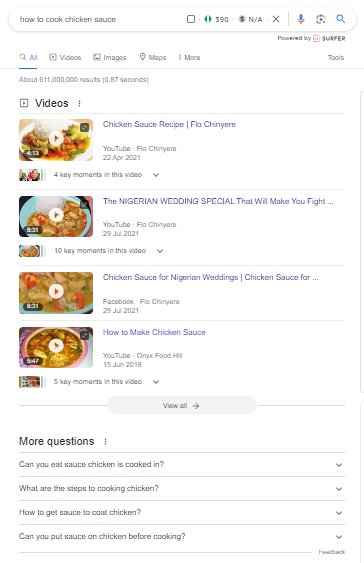
By optimizing your content and website structure to align with specific SERP features, you can increase your chances of being featured. For instance, creating content that answers frequently asked questions can help you secure a spot in the “People Also Ask” section, boosting your visibility and click-through rate.
- Optimizing for Featured Snippets
Featured snippets are concise, highlighted answers that appear at the top of some search results. Optimizing for featured snippets involves structuring your content in a way that positions it as the ideal answer to a user’s query.
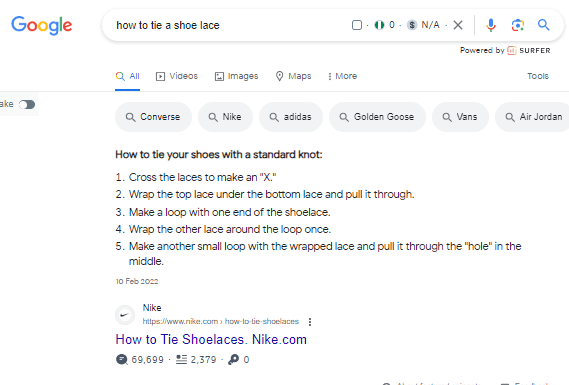
To optimize for featured snippets, you should format your content with clear, concise answers, use bullet points or numbered lists, and ensure your content provides in-depth information on the topic. When Google identifies your content as the best fit for a featured snippet, it can significantly increase your visibility and clickability.
- Considering Google Discover for Content Promotion
Google Discover is a platform that showcases personalized content to users based on their interests and search history. Leveraging Google Discover can help you reach a broader audience and improve clickability.
To make your content suitable for Google Discover, focus on producing high-quality, engaging content that aligns with the interests of your target audience. Use eye-catching visuals and appealing headlines to capture users’ attention when your content appears in their Discover feed, ultimately driving more clicks to your website.
Final Take-aways
When you master Technical SEO it is like ensuring your website’s engine is finely tuned for peak performance. While it may not be the most glamorous aspect of SEO, it’s undeniably crucial. By meticulously optimizing the technical underpinnings of your site, you pave the way for better visibility, higher rankings, and improved user experiences.
This comprehensive guide has equipped you with the knowledge and tools needed to embark on your Technical SEO journey. Remember that, like any engine, your website requires regular maintenance and fine-tuning to stay competitive in the ever-evolving digital landscape.
Stay diligent, keep an eye on emerging trends, and continually optimize your site’s technical aspects to unlock its full potential in the world of search engine optimization.